Guardsquare recommended technique
| Technique summary | |
| Technique | Secure keyboard |
| Against | Screen recording, Malicious keyboard, and UI injection attacks |
| Limitations | None |
| Side effects | May reduce user's functionality compared to the standard keyboard |
| Recommendations | Recommended for use on Android API Level ≤ 30 (Android ≤ 11)./td> |
A secure in-app keyboard for Android apps is a specialized keyboard designed to enhance security and privacy when users input sensitive information within an application. Unlike standard keyboards, which might be susceptible to various forms of interception, secure in-app keyboards are specifically engineered to mitigate these risks.
Keypress leaks
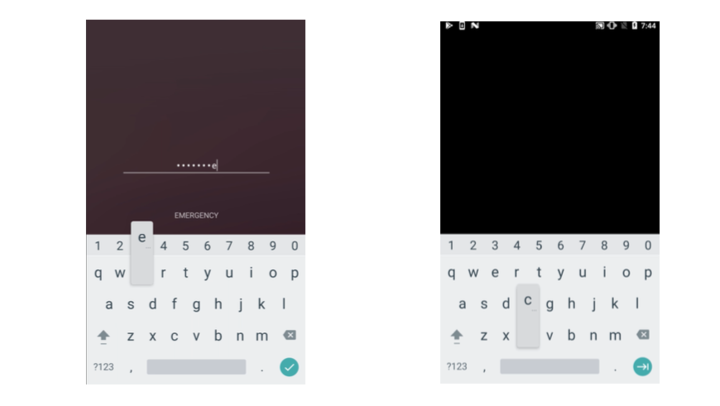
Left: Unprotected view. Right: Protected view leaking information through the keyboard.
In Android ≤11 the standard keyboard may leak information about keypresses:
The solution would be to use a dedicated keyboard for the application, and setting FLAG_SECURE on the keyboard. As a result, every time the user is typing, the keyboard would appear, and the screen would become black. However, this might not be convenient to happen everywhere in terms of UX.
A better solution could be to apply FLAG_SECURE only on specific edit text views. This can be done by filtering by a particular field ID, which can be obtained from the symbol list. For example:
Malicious keyboards
Malicious keyboards can replace the user's default keyboard entirely, leading to continuous keylogging. A dedicated secure in-app keyboard helps mitigate the risk.
Table of contents